Brod sheet-very tall low out that folded in half
flag-the name of the news paper
a jump -a reference point tells you when the journey continu
by line - the name of the writer and there title
info graphic-a visual
info
Friday, March 28, 2014

Superintendent Carstarphen leaving for Atlanta job -Proximity
this is proximity because it is in our district near us
http://www.statesman.com/news/news/local/court-puts-father-in-charge-of-son-on-life-support/nfMkn/ -Human Interest
theirs drama with the father his son and him getting tried for Cort
Wednesday, March 26, 2014
news values
NOTES
timeliness - date
proximity -how close
conflict-people fight
prominence-famous of important people
human interest-drama
impact-affect people
novelty-how weird
timeliness - date
proximity -how close
conflict-people fight
prominence-famous of important people
human interest-drama
impact-affect people
novelty-how weird
Monday, February 10, 2014


Wednesday, January 29, 2014
Magazine Essential Parts
master head. the company
Selling line.
deadline.the date
cover line.its like the sub heading within the photo
main image.the main pic it the photo
model credit. giving credit to the model
bar code. serial number where its from price
left third. the head lines
left cover line. the meaning of the main photo

Selling line.
deadline.the date
cover line.its like the sub heading within the photo
main image.the main pic it the photo
model credit. giving credit to the model
bar code. serial number where its from price
left third. the head lines
left cover line. the meaning of the main photo
Thursday, January 23, 2014
photoshop introduction
Under the heading "Common Tools" describe in your own words, what the function is for the following tools.
4. Crop Tool
lets you take all the unwanted space around the perimeter you want
5. Lasso Tool
lets you single out a portion of the photo you want to change
6. Text Tool
Lets you put words in your image.
7. What buttons do you push to "Undo" a mistake you made?
command-z
8. What can you open to "undo" more than one mistake? How do you open it?
9. How do you rotate an image?
Go to the image menu and select Image Rotation.
10. If you don't like the initial cropping box you drew, how can you change it before you make your crop?
12. What is the correct resolution for newsletters and newspapers?
As a general guideline, newsletters and newspapers are likely to require resolutions in the range of 150 to 200 ppi
13. What is the correct resolution for magazines?
4. Crop Tool
lets you take all the unwanted space around the perimeter you want
5. Lasso Tool
lets you single out a portion of the photo you want to change
6. Text Tool
Lets you put words in your image.
7. What buttons do you push to "Undo" a mistake you made?
command-z
8. What can you open to "undo" more than one mistake? How do you open it?
Pull up the History palette. You can do this by going to the Window --> History menu.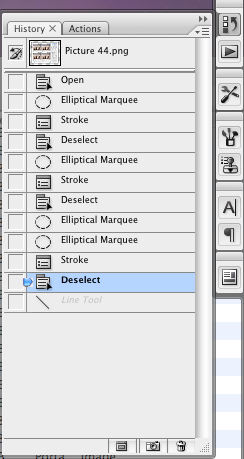
In Adobe Photoshop CS3, the History palette, as well as several other palettes, are docked in a bar on the right site of the screen. Click on the various icons to display the windows, or you can grab the windows and drag them to other parts of the screen.
The history palette will store every action you take in the program as a list. To undo, simply click on a previous item on the list and it will undo every action listed after it. If you complete another action, it will erase actions you've previously undone.
9. How do you rotate an image?
Go to the image menu and select Image Rotation.
10. If you don't like the initial cropping box you drew, how can you change it before you make your crop?
You can use the cancel icon (looks like a no-smoking circle) or the OK icon (looks like a checkmark) that is located at the top right of the options bar.
11. Under the heading "Resizing while Cropping" when you enter dimensions as you crop, what are you telling Photoshop to do as you crop your image? HINT: it involves ratios.
11. Under the heading "Resizing while Cropping" when you enter dimensions as you crop, what are you telling Photoshop to do as you crop your image? HINT: it involves ratios.
dimensions the image should result in after your crop.
12. What is the correct resolution for newsletters and newspapers?
As a general guideline, newsletters and newspapers are likely to require resolutions in the range of 150 to 200 ppi
13. What is the correct resolution for magazines?
magazines are likely to prefer high resolution images of 250 ppi or more.
Subscribe to:
Posts (Atom)